


A slow WordPress website is frustrating. A fast website with a broken checkout is worse.
That is the central challenge facing businesses that use Elementor and WooCommerce together. The same optimizations that can make a WordPress site load more quickly can also interfere with dynamic pages, customer sessions, payment flows, forms and scripts.
This is why WordPress performance work should never be reduced to one goal: chasing the highest possible benchmark score.
The real objective is more practical:
Make the website noticeably faster while keeping every commercially important workflow stable.
That means improving page delivery, reducing image weight, controlling JavaScript, optimizing CSS, using Cloudflare effectively and measuring the experience of real visitors. It also means knowing when not to cache a page, which scripts must remain untouched and how to roll back a change when an optimization causes a conflict.
For Elementor and WooCommerce websites, the safest approach is a complete performance stack rather than a collection of unrelated tweaks.
Why Elementor and WooCommerce websites become slow
Elementor makes it easier to build visually rich WordPress pages without writing code from scratch. WooCommerce makes it possible to run an online store from the same WordPress installation.
Both tools are powerful. Both also add complexity.
An Elementor page may load multiple stylesheets, scripts, fonts, images and interactive components. A WooCommerce store introduces dynamic areas that need to respond differently for each visitor, including carts, checkout pages, customer accounts and payment-gateway workflows.
Several performance problems often appear at the same time:
- Images are uploaded at unnecessarily large dimensions.
- Older image formats are served when modern alternatives would be lighter.
- CSS files load globally even when only part of the page needs them.
- JavaScript executes before it is required.
- Third-party scripts delay interactivity.
- Cloudflare is enabled but not configured around WordPress behavior.
- A caching plugin treats dynamic store pages too aggressively.
- Several optimization plugins overlap and compete with one another.
- A managed host already provides server-level caching, but another caching layer duplicates the same work.
The result is often an unstable stack. One plugin handles caching. Another converts images. A third integrates with Cloudflare. A fourth provides database cleanup. A fifth attempts to monitor speed. A sixth delays scripts.
Each tool may be useful on its own. The difficulty is making them work together predictably.
Start with the pages that must never break
Before enabling aggressive performance settings, identify the pages that generate revenue or handle user-specific information.
For a WooCommerce store, these usually include:
- Cart pages
- Checkout pages
- Customer account pages
- Login pages
- Payment confirmation pages
- Subscription-management areas
- Product pages with dynamic stock information
- Forms that depend on live validation
- Selected REST API endpoints
- admin-ajax.php requests
These areas require special treatment.
A visitor browsing a static blog post can often receive a cached HTML page safely. A returning customer with products in a cart cannot always receive the same cached response as a first-time visitor.
A safe optimization stack must distinguish between static and dynamic behavior.
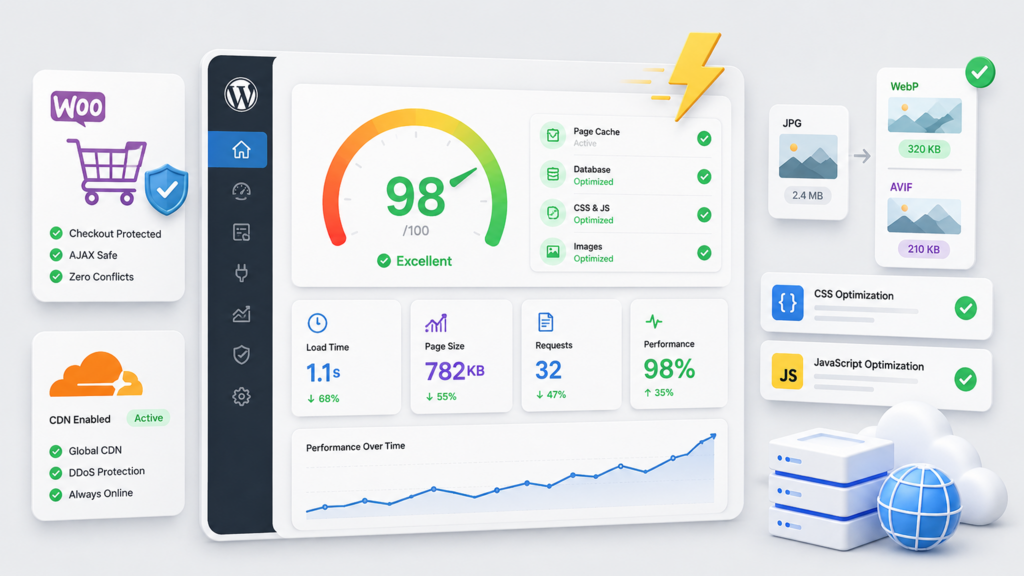
This is one reason Sitetrail Turbo was built with WooCommerce-aware protections. The plugin includes cart, checkout and account exclusions, WooCommerce cookie bypass logic, fragment handling, product-page controls, payment-gateway safe mode and purge logic for stock and status changes.
The purpose is not merely to accelerate the site. It is to accelerate the site without interfering with the workflows that matter most.
Full-page caching remains essential
Caching is still one of the most effective ways to improve WordPress performance.
When a page is cached, WordPress can serve a prepared HTML version rather than rebuilding the page from scratch for every visitor. This reduces server work and can significantly improve response times.
Sitetrail Turbo includes filesystem-based full-page caching, sitemap-aware cache preloading, automatic purging when content changes, manual cache controls, mobile-cache support and diagnostics that help identify configuration issues.
However, caching should never be applied blindly.
The plugin also detects cases where a server already provides strong page caching, including LiteSpeed Server Cache, FastCGI Cache and Varnish. In those environments, Turbo can enter Purge Mode.
Purge Mode avoids duplicate page caching while keeping the tools that still add value: image optimization, Cloudflare controls, diagnostics, CSS and JavaScript optimization, reports and real-user performance monitoring.
This is particularly useful for managed WordPress hosts, agencies and infrastructure providers. The plugin works with the environment rather than overriding it unnecessarily.
Image optimization is one of the easiest performance wins
Large images are among the most common reasons an Elementor page loads slowly.
A visually impressive landing page may include banners, icons, product photos, background images and mobile variants. If each file is uploaded at full resolution and served in an older format, the total page weight can increase rapidly.
Modern image formats can help.
Sitetrail Turbo includes local image optimization with WebP and AVIF conversion. It can also compress images, resize oversized uploads, lazy-load images and videos, detect heavy media files and preload likely LCP images.
Original files are preserved.
The delivery logic prioritizes the most efficient supported format:
AVIF → WebP → original image
This gives website owners a practical way to improve image delivery without relying on a separate cloud-based image-processing workflow.
For Elementor websites in particular, image optimization can produce a noticeable difference because media-heavy layouts are common.
CSS and JavaScript need careful treatment
A slow page is not always caused by the server.
Front-end assets also matter.
CSS can delay rendering when too much of it loads before the visible part of the page is ready. JavaScript can delay responsiveness when scripts execute too early or block the browser from completing more important work.
Sitetrail Turbo includes:
- CSS minification
- CSS combination where appropriate
- Local Remove Unused CSS
- Local critical CSS generation
- Asynchronous CSS loading
- JavaScript minification
- JavaScript deferral
- Delayed script execution
- Per-page exclusions
- Per-script exclusions
- Curated safelists
- WooCommerce and form-safe behavior
These tools are valuable because optimization is not one-size-fits-all.
A script that can be delayed safely on a blog post may be essential on a checkout page. A CSS optimization that works on one theme may affect the layout of another.
Granular exclusions matter.
Restore points make optimization safer
Every serious WordPress performance workflow needs a fallback plan.
Even a carefully designed optimization can conflict with a theme, plugin or checkout flow. This is especially true on websites with custom scripts, third-party tools or complex page-builder layouts.
Sitetrail Turbo includes restore points, settings snapshots, one-click restore, change logs, break detection, HTTP validation after risky changes and auto-rollback notices.
This allows website owners and agencies to test improvements more confidently.
Instead of making a change and hoping for the best, the optimization process becomes reversible.
That is important for agencies managing client sites. It is equally important for store owners who cannot afford unexpected downtime during a sales campaign.
Cloudflare should be configured around WordPress
Cloudflare can improve speed, resilience and edge delivery, but it needs to be configured intelligently.
A generic cache rule can cause problems when it treats all WordPress pages the same way.
Sitetrail Turbo includes Turbo Cloudflare Manager, which brings relevant controls into the WordPress dashboard.
Users can:
- Connect Cloudflare using an API Token or Global API Key
- Verify the connection
- Detect the active plan
- Purge edge cache
- Review Brotli and HTTP/3 settings
- Apply WordPress-aware cache recommendations
- Protect cart, checkout and account pages
- Bypass logged-in users
- Avoid caching sensitive requests
- Detect APO compatibility
- Detect Workers-related conflicts
This makes it easier to use Cloudflare as part of a coordinated WordPress performance strategy rather than as a disconnected service.
Real-user Core Web Vitals are more useful than vanity scores
A one-off speed test can be helpful. It can also be misleading.
A laboratory test reflects one simulated visit under one set of conditions. Real users visit from different locations, devices, browsers and networks.
Sitetrail Turbo includes Visitor Experience™, a lightweight real-user monitoring system that tracks important Core Web Vitals:
- LCP: how quickly the main visible content loads
- INP: how responsive the page feels when a visitor interacts with it
- CLS: how stable the layout remains while loading
The system uses the 75th percentile and displays familiar “good”, “needs improvement” and “poor” performance bands.
It also separates desktop and mobile results.
The analytics remain local. Aggregated results are stored in the website’s own database. There are no visitor profiles, no session tables and no analytics uploads to Sitetrail.
This creates a better performance question:
Are real visitors actually experiencing a faster website?
Why Sitetrail Turbo is a credible alternative to familiar speed plugins
WordPress users evaluating performance tools often compare several established options.
Sitetrail Turbo can serve as a WP Rocket alternative for businesses seeking a broader self-contained suite with local image conversion, Cloudflare controls, restore points and real-user Core Web Vitals.
It can serve as a LiteSpeed Cache alternative for users who need a host-agnostic tool that can adapt when server-level caching is already present.
It can serve as a W3 Total Cache alternative for users who want strong caching and optimization controls presented through a clearer guided workflow.
It can serve as a WP-Optimize alternative for users who want broader performance visibility alongside caching, database-cleanup opportunities, image conversion and rollback protection.
The point is not that every website should choose the same plugin.
The point is that modern WordPress performance often requires more than one narrow function.
Sitetrail Turbo is designed to consolidate the most important functions inside one plugin.
Reduce plugin sprawl before it becomes a problem
Running several overlapping performance plugins can create confusion.
One plugin may minify CSS while another attempts to combine it. One may lazy-load images while another rewrites image markup. One may handle Cloudflare purging while another changes cache behavior. A server-level cache may already be active without the site owner realizing it.
Sitetrail Turbo includes a migration wizard that detects competing caching and optimization plugins, identifies overlaps and helps users simplify the stack.
This matters because fewer moving parts generally make troubleshooting easier.
The best WordPress optimization stack is not necessarily the one with the most plugins. It is the one that makes the site faster while remaining understandable, reversible and stable.
A broader WordPress plugin track record
Sitetrail Turbo also builds on Sitetrail’s growing WordPress plugin portfolio.
That includes AI Live Chat PRO, a WordPress live-chat plugin with AI-powered support features, and Woo Toolbox, an all-in-one WooCommerce utility suite designed to replace several smaller store-management plugins.
This track record matters because website owners are more likely to take a new performance plugin seriously when it comes from a developer already building practical WordPress tools around real business needs.
Sitetrail Turbo follows the same philosophy: reduce fragmentation, simplify workflows and retain control.
The safer path to a faster Elementor and WooCommerce site
Speed matters.
It affects visitor experience, conversion rates, engagement and the overall impression a business creates online.
But speed should never come at the expense of stability.
For Elementor and WooCommerce websites, the safer approach is to use a performance stack that understands dynamic pages, modern image formats, Cloudflare behavior, front-end assets, real-user metrics and rollback protection.
Sitetrail Turbo brings those elements together.
The result is not simply a faster WordPress site.
It is a faster site with fewer overlapping plugins, clearer performance insights and a more reliable path to improvement.