


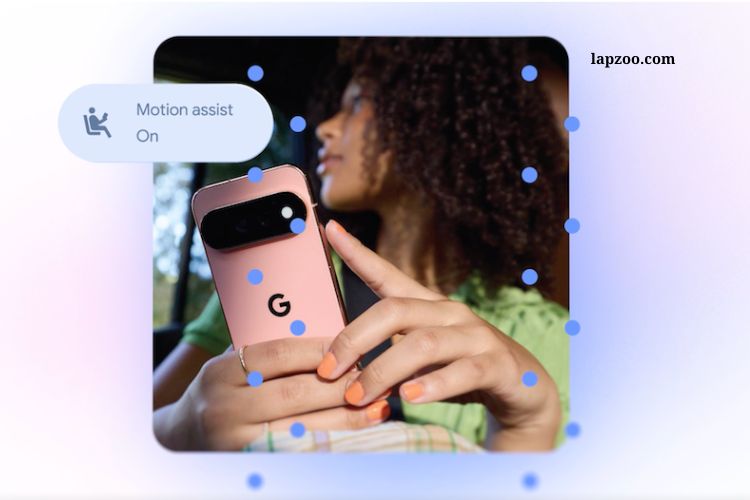
Google is rolling out five new Android features designed to make smartphones more accessible, useful, and personalized. The September 2026 Android update introduces tools focused on motion sickness, visual accessibility, item tracking, and Google Messages customization.
The update also highlights Google’s growing use of Gemini to deliver smarter, context-aware features. While some additions are similar to tools already available on Apple devices, Google is expanding the experience with its own Android-focused approach.
Read More: Essential diagnostic tools for modern eye care clinics
Motion Assist Helps Reduce Motion Sickness
One of the most notable additions is Motion Assist, a feature designed for people who experience motion sickness while using their phones in moving vehicles.
Motion sickness can happen when the eyes see movement on a screen while the body senses a different type of motion. This disconnect can make activities such as reading, browsing, or watching content uncomfortable during car rides.
Motion Assist aims to reduce this problem by displaying a bubble overlay on the screen. The bubbles move according to the vehicle’s motion, helping create a closer connection between what users see and what their bodies feel.
Users can customize the feature based on their preferences. Android allows them to adjust the bubble’s shape, color, and transparency. They can also add Motion Assist to Quick Settings for easier access or set it to activate automatically when needed.
The feature is available for devices running Android 17, giving users a built-in option to make smartphone use more comfortable while traveling.
Guided Vision Brings Gemini-Powered Assistance
Google is also introducing Guided Vision, a feature created to support blind and low-vision users. It combines the smartphone camera with Gemini to help users understand and interact with objects and information around them.
For example, Guided Vision can help read small text on food packaging, understand a menu in a dim restaurant, or identify objects around the home. This can make everyday tasks more accessible without requiring users to manually interpret everything through their phone’s screen.
The feature goes beyond simply recognizing objects. Guided Vision can provide voice instructions when the camera needs to be repositioned. It may tell users to move the phone, pan across an area, or place an object in the center of the camera view.
This guidance can make visual assistance easier to use, especially when the phone needs to capture a particular item or piece of text accurately.
Guided Vision is designed for phones running Android 9 and newer in regions where Gemini is available.
Android Gets Smarter at Remembering Important Items
Google’s latest Android improvements also focus on helping users remember where they left important belongings.
Losing everyday items can be frustrating, particularly when users cannot remember where they last placed them. The new Android experience is designed to make remembering these locations easier by using information captured through the phone.
This type of feature can be especially useful for objects that users frequently move around their homes, offices, or other familiar places. Instead of relying entirely on memory, users can use their Android device to help recall where an important item was previously left.
The feature reflects Google’s broader effort to make Android more context-aware. Rather than simply responding to commands, smartphones are increasingly becoming tools that help users organize information from their everyday activities.
More Personalization Comes to Google Messages
Google is also adding new personalization options to Google Messages.
Messaging has become one of the most frequently used smartphone activities, so customization can make conversations feel more personal. The latest improvements give users additional ways to change the appearance and feel of their chats.
These options are part of Google’s continued effort to make Messages more flexible while maintaining its role as a central communication app on Android devices.
Personalization may seem like a small improvement compared with accessibility tools, but it can make the messaging experience more enjoyable for people who spend significant time communicating through their phones.
Google Expands Gemini’s Role on Android
A major theme across the new Android features is the growing role of Gemini.
Google is increasingly using its AI technology to help Android devices understand visual information and provide more useful assistance. Guided Vision is a clear example because it combines camera capabilities with Gemini to interpret what users are seeing.
This approach could make smartphones more helpful in situations where traditional menus and apps are not enough. Instead of searching through different tools, users can increasingly rely on AI-powered assistance to understand objects, text, and surroundings.
Google’s strategy also shows how artificial intelligence is becoming closely connected with accessibility. AI can process visual information quickly and turn it into useful spoken guidance, potentially creating more flexible ways for people to interact with their devices.
Android and Apple Continue to Develop Similar Features
Some of Google’s latest accessibility improvements follow ideas that Apple has already introduced.
Motion Assist, for example, has similarities to Apple’s Vehicle Motion Cues, which Apple introduced to help reduce motion sickness while users interact with their iPhones in moving vehicles.
Apple’s system uses animated dots positioned around the edges of the display. These dots respond to changes in vehicle movement and are designed to reduce the sensory conflict that can contribute to motion sickness.
Google’s approach uses moving bubbles instead, while offering customization options such as shape, color, and transparency.
The similarities demonstrate a broader trend in the smartphone industry. Accessibility features are no longer limited to basic settings. Companies are increasingly using motion sensors, cameras, artificial intelligence, and other technologies to address everyday challenges.
Why the September Android Update Matters
The latest Android update is significant because it focuses on practical improvements rather than simply adding new entertainment features.
Motion Assist addresses a common problem for people who use phones while traveling. Guided Vision focuses on accessibility and provides additional support for blind and low-vision users. Item-location tools can help users remember where they placed important belongings, while Google Messages receives additional personalization options.
Together, these updates show how smartphones are evolving into more adaptive personal tools.
The use of Gemini is particularly important because AI can help Android respond to situations that traditional smartphone software may struggle to understand. Camera-based assistance, voice guidance, and contextual information can make devices more useful in everyday environments.
Availability and Compatibility
Availability varies depending on the feature and device.
Motion Assist is designed for Android 17 devices, while Guided Vision is available on phones running Android 9 and newer in countries where Gemini is supported. Other features may depend on device compatibility, regional availability, and the version of Google’s apps and services installed on the phone.
Users may therefore receive different features at different times. Checking Android system updates and keeping Google apps updated can help ensure eligible devices receive the latest improvements.
What Users Can Expect Next
Google’s latest Android additions suggest that future smartphone updates will place greater emphasis on accessibility, personalization, and AI-powered assistance.
Instead of focusing only on faster performance or visual changes, Google is addressing specific problems users face in daily life. Motion sickness, visual navigation, misplaced belongings, and personalized communication are all practical areas where smartphones can provide meaningful assistance.
Gemini also gives Google an opportunity to connect these features with more intelligent software. As AI capabilities develop, Android could offer increasingly personalized assistance based on what users see, hear, and do.
Frequently Asked Questions:
What is Google’s new Android update?
Google’s latest Android update introduces new features focused on accessibility, personalization, and everyday convenience, including tools for motion sickness and visual assistance.
What is Motion Assist on Android?
Motion Assist is a feature designed to reduce motion sickness while using an Android phone in a moving vehicle. It displays moving bubbles that respond to the vehicle’s motion.
How does Motion Assist help with motion sickness?
Motion Assist aims to reduce the disconnect between what your eyes see on the phone and what your body feels during movement by displaying motion-responsive bubbles on the screen.
Can users customize Motion Assist?
Yes. Users can customize the bubbles by changing their shape, color, and transparency. They can also add Motion Assist to Quick Settings or enable it automatically.
What is Guided Vision?
Guided Vision is an accessibility feature that combines the smartphone camera with Gemini to help blind and low-vision users understand objects, text, and surroundings.
How can Guided Vision help users?
Guided Vision can assist with tasks such as reading small text, viewing menus, and identifying objects. It can also provide voice guidance when users need to reposition the camera.
Which Android devices support Guided Vision?
Guided Vision is designed for phones running Android 9 and newer in countries where Gemini is available.
Conclusion
Google’s latest Android update brings meaningful improvements focused on accessibility, comfort, and personalization. Features like Motion Assist aim to make phone use easier for people experiencing motion sickness, while Guided Vision uses Gemini to provide helpful support for blind and low-vision users. Additional tools for finding misplaced items and customizing Google Messages make the update even more useful. Overall, Google is pushing Android toward a smarter and more accessible mobile experience with practical features designed for everyday needs.