


Booking a hotel often feels like a bet. You find a room you like, you wonder if the price will fall next week, and you either book now and worry or wait and risk watching it climb. Most travelers settle for a guess. A smarter way exists, and it does not require you to refresh a booking page every evening.
Automated notifications can watch the market for you. You tell a tool which property, dates, and budget you care about, and it speaks up only when something worth acting on happens. That might be a nightly rate dropping from $245 to $198, or a cheaper room type opening up at the same hotel. You stay in control of the decision. The tool just handles the watching.
This buyer’s guide walks you through the whole topic in plain language. You will learn why rates move, how notification systems work, which alert types fit which trips, what features separate a useful service from a noisy one, and how to set everything up in about fifteen minutes. We also cover the mistakes that quietly turn good tools into ignored inbox clutter, and we finish with answers to the questions travelers ask most.
One honest note before we begin: no service can promise you the lowest price on every stay. What a good setup can do is improve your odds, save you time, and give you evidence instead of hunches. All dollar figures below are examples meant to illustrate how the process works.
Why Hotel Price Alerts Are Worth Setting Up
Hotels do not publish one fixed price and stick with it. They adjust rates continuously based on demand, occupancy, local events, and what nearby competitors charge. Two travelers looking at the same room on the same night can see different numbers depending on when and where they look. Notifications give you a way to follow that movement without living inside a browser.
The benefits fall into three simple buckets. First, money: even a modest drop of $25 per night adds up to $100 on a four night stay. Second, time: you skip the repetitive checking that eats up evenings during trip planning. Third, confidence: when you book, you know the rate you paid sits near the low end of what that room has recently cost.
The Real Cost of Booking Blind
Picture two friends planning the same weekend in the same city. One books the first decent option and never looks again. The other books a refundable room, sets a watch on it, and gets a nudge ten days later when the rate falls 14 percent. They end up in identical rooms, yet one pays noticeably more for no reason other than timing.
Booking blind also makes it hard to judge whether a deal is real. A banner that says “20 percent off” means little if the original price was inflated. Seeing a rate’s recent history gives you a fair baseline, so you can spot genuine bargains and ignore fake urgency.
What Rate Drop Notifications Can and Cannot Do
Be realistic about the limits. Notifications cannot create a discount where none exists. If a city is hosting a major festival and every property is sold out, no tool will conjure cheap rooms. They also cannot guarantee that a price will fall before your trip.
What they can do is catch the moments when prices do fall, which happens more often than most people expect. They also remove the emotional side of booking. Instead of panicking over a price jump, you follow a simple rule you set in advance, and that makes decisions calmer and cheaper.
How Room Rate Notifications Work Behind the Scenes
Understanding the basics helps you judge which services are trustworthy. Every system, simple or sophisticated, follows the same three step pattern.
Step One: Collecting the Rates
The service checks prices for the property and dates you saved. It might pull from hotel systems, booking channels, or both. How often it checks matters a great deal. A service that looks once a day can miss a short dip, while one that checks several times a day is more likely to catch it.
Step Two: Comparing Against Your Rules
Each new price is compared with the rule you set. The rule could be an exact number such as $180, a percentage drop from the current rate, or a move below the lowest price seen so far. If the new rate meets the rule, the system flags it. If not, it stays quiet and keeps watching.
Step Three: Delivering the Message
When a rule is met, you hear about it by email, text, push notification, or a dashboard. The best messages include the new rate, the old rate, the dates, the room type, and the cancellation terms, so you can decide in seconds. Messages that say only “price changed” leave you doing the work again.
Two details deserve extra attention. The first is the cancellation policy attached to each price, because a refundable rate and a non-refundable rate are different products even when they look alike. The second is the total cost. A drop in the base rate means little if taxes and fees stay the same or rise, so choose a service that shows the final amount when possible.
Types of Price Drop Notifications You Can Choose From
Not every traveler needs the same kind of rule. Picking the right trigger is half the battle, so here are the most common options and when each one shines.
Target Price Rules
You name the number you are willing to pay, and the tool tells you when the rate reaches it. This works best when you already know your budget, for example $150 per night. The risk is setting a target that is too low, which can leave you waiting for something that never happens.
Percentage Drop Rules
Instead of a fixed number, you ask to be told when the price falls by a set amount, such as 10 or 15 percent. This adapts to different cities and seasons and suits travelers who do not yet know what a fair price looks like.
Date Range Watches
Here you track several arrival dates at once, such as any Thursday to Sunday in a month. The tool shows which nights are cheapest, which is ideal if your schedule has some give.
Room Type and Perk Watches
Sometimes the best deal is an upgrade. You can watch a standard room and a suite together, then act if the gap narrows. Some people also watch for rates that include breakfast or parking.
Lowest Price Seen Rules
This rule alerts you only when a rate hits a new low for the dates you track. It filters out minor wobbles and gives you fewer, higher quality messages. It is a good fit for people who dislike notification overload.
Most travelers do well combining two types, for instance a percentage drop plus a date range watch. Start simple, see how often you hear from the tool, and adjust.
What to Look for When Comparing Hotel Deal Alert Services
Once you know which trigger you want, you can start comparing services. Marketing pages tend to promise everything, so focus on the features that change your results.
Frequency of checks. More frequent rate checks mean a better chance of catching a short dip. Ask how often the service refreshes prices, and be wary of vague answers like “regularly.”
Clear, complete messages. A useful notification shows old price, new price, dates, room type, cancellation terms, and the total cost. If you have to click through three screens to learn those details, the message is not doing its job.
Flexible rules. You should be able to mix target prices, percentage drops, and date ranges. A rigid tool that offers only one rule forces you into compromises.
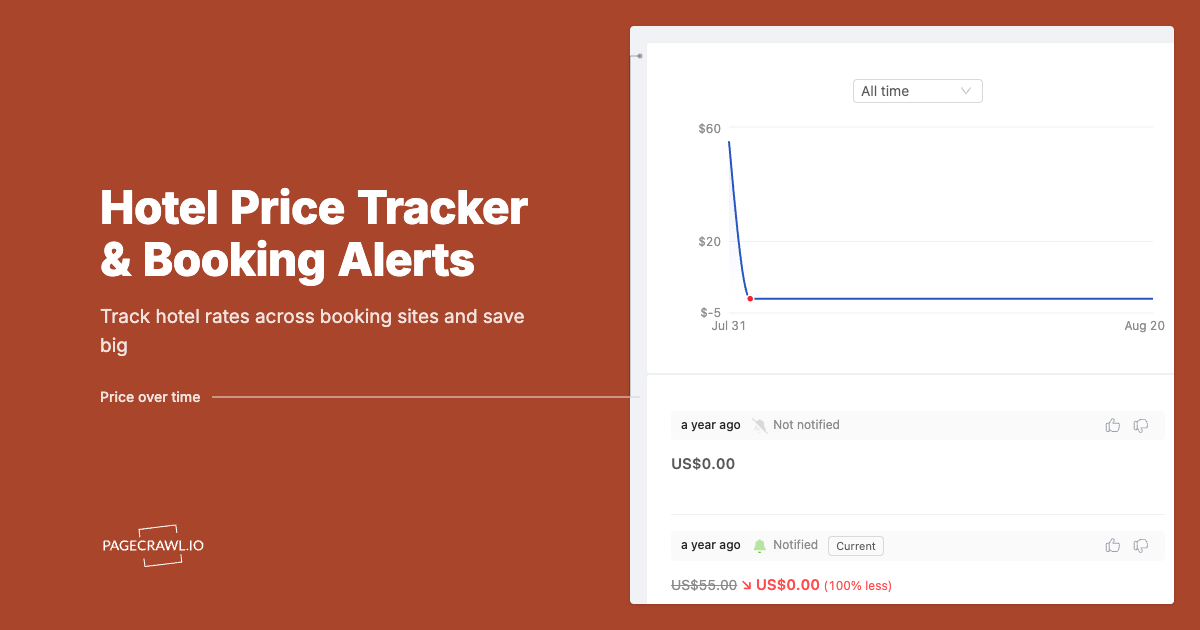
Price history. A simple chart of recent rates lets you tell a bargain from an average price. Without it, you are trusting the notification blindly.
Channel choice. Email suits planners, push messages suit people who act fast, and text works for urgent last-minute stays. The ability to choose, and to pause messages, keeps the tool from becoming a nuisance.
Transparent privacy practices. Look for plain statements about what data is collected, how long it is stored, and whether it is shared. If the policy is hard to find or hard to read, treat that as a warning.
Fair pricing. Many services start free and charge for extras. Make sure the free tier is useful and that paid plans can be cancelled easily.
Here is a quick reference you can use while evaluating options:
| Feature | Why it matters | Question to ask |
| Check frequency | Catches short price dips | How often are rates refreshed? |
| Message detail | Speeds up decisions | Does it show total cost and cancellation terms? |
| Rule flexibility | Fits your budget and dates | Can I combine rule types? |
| Price history | Separates deals from hype | Can I see weeks of past rates? |
| Privacy | Protects your data | What is stored and shared? |
How to Set Up Rate Drop Alerts Step by Step
Setup takes about fifteen minutes, and most of that is thinking rather than clicking. Work through these steps in order.
- Write down your trip basics. List your destination, dates, number of guests, budget ceiling, and any must-haves such as breakfast, parking, or a quiet room.
- Shortlist two to four properties. Include a first choice, a backup, and one option slightly outside your usual budget. Comparing several gives you a better feel for the market.
- Choose a service. If you want a straightforward starting point, try hotel price alerts built to watch your saved stays and flag meaningful changes so you can focus on planning.
- Pick the right rule. Use a percentage drop if you are unsure about a fair price, or a target price if you already know your number.
- Book a refundable rate first. This protects you against rising prices and gives the notifications something to beat.
- Choose your delivery method. Select email or push, and decide how many messages per week you can tolerate.
- Act within the day. When a notification arrives, check the total cost and cancellation terms, then rebook if the numbers work.
- Cancel the old reservation last. Wait until the new booking is confirmed in writing before you release the original one.
A small example shows how it all fits together. You book a refundable room at $230 per night for two nights, a total of $460 before taxes. You set a 10 percent drop rule. Eleven days later you receive a message showing $196 for the same room and terms. You rebook, cancel the first reservation, and keep $68 in your pocket. The whole process takes about ten minutes.
Matching Booking Alerts to Your Trip Type
Properties set prices using revenue management techniques that react to different demand patterns, so the best alert strategy depends on the kind of trip you are planning.
Family Vacations
Families usually book early and need space, which makes budgets tight. Book a refundable room months ahead, then use a percentage drop rule and keep it active until the cancellation deadline. Even small savings multiply across a week.
Business Trips
Business travel often involves short notice and repeat visits to the same city. Track a few preferred properties near your meetings and use a lowest price seen rule to avoid constant messages. Over a year, the notes you gather reveal which weeks are cheapest.
Weekend Getaways
Weekend rates can swing sharply based on local events. A date range watch across two or three weekends shows you the quietest option, and a target price rule helps you pounce when the number is right.
Events and Weddings
Rates near big events rise early and fast. Book a refundable room as soon as dates are confirmed, then watch for drops caused by cancellations. Hotels sometimes release rooms from blocks close to the event, creating brief openings.
Long Stays
For stays of a week or more, check whether a lower weekly or monthly rate appears. Because the total is large, even a 5 percent change can be worth acting on, so keep your thresholds modest.
Mistakes That Make Price Watching Useless
A good tool can still fail you if you set it up carelessly. These are the traps to avoid.
Setting too many alerts. Tracking fifteen properties across ten date ranges sounds thorough, but it buries you in messages. Within a week you start swiping them away, and the one that mattered gets missed. Keep your list tight.
Setting a target that is far too low. If the usual rate is $220, a $110 target will almost never fire. Look at price history first and aim for a realistic drop of 10 to 20 percent.
Ignoring the fine print. A cheaper rate may be non-refundable, may exclude breakfast, or may carry higher fees. Always compare the whole package, not just the headline number.
Waiting for perfection. Rates do not fall forever. When a notification meets your goal and the terms are good, act the same day. Waiting for another small drop is how people lose rooms.
Cancelling before confirming. Never release your original booking until the replacement is confirmed. This single habit prevents the most expensive mistake in the process.
Forgetting to switch alerts off. Once your free cancellation window closes, rebooking is no longer an option. Pause the watch so you are not tempted by messages you cannot use.
Avoid these six, and your results will improve even if you change nothing else.
Final Thoughts on Smarter Hotel Booking
Hotel rates will keep moving, and no service can predict every change. What a thoughtful setup gives you is information, timing, and calm. You stop guessing, you stop refreshing pages, and you book with a clear picture of what a fair rate looks like.
Start small. Choose one trip, pick one or two rule types, and book a refundable room as your safety net. See how it feels, adjust your targets, and expand from there. The effort is modest, the potential savings are real, and your next stay can cost exactly what it should.
Frequently Asked Questions
1. How often should I expect to receive a notification?
It depends on your rules and the market. With a tight target price you may hear nothing for weeks, while a broad percentage rule in a busy city could trigger several messages. Most people prefer one to three useful messages per trip, so adjust thresholds until that feels right.
2. Can I really rebook at a lower price?
Yes, as long as your original reservation is refundable and the new one is confirmed. Check the cancellation deadline on the first booking, compare total costs on both, and cancel the old one only after the new confirmation arrives.
3. Do rate watching tools work for last-minute stays?
They can, but the window is short. Rates often soften a few days before arrival when rooms remain unsold, so text or push messages are helpful. Just remember that popular destinations can also sell out, so do not gamble on a trip you cannot afford to lose.
4. Is it safe to share my email or phone number with these services?
It can be, if the service explains what it collects and how it stores that information. Read the privacy policy, avoid tools that request unrelated permissions, and use an email address you are comfortable receiving promotional messages at.
5. What if the price goes up after I set a watch?
That is why booking a refundable rate first is so useful. If prices climb, you already hold the lower rate. If they drop, you can rebook. Either way you are protected, and the alert simply helps you capture the upside.
