


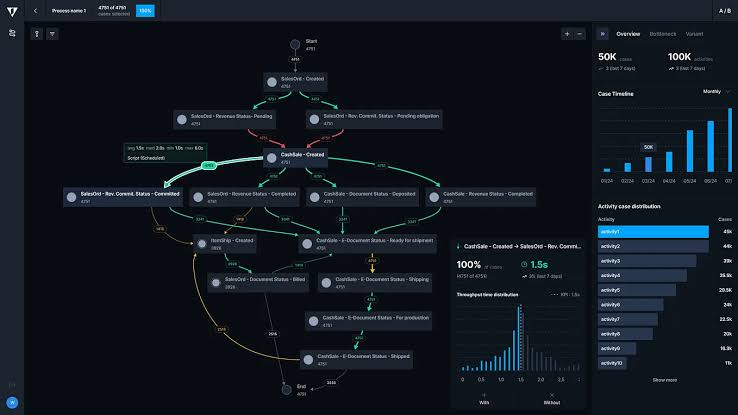
Every business runs on processes — approvals that need to happen in a specific order, notifications that need to reach the right people, records that need to move through defined stages before they’re considered complete. In many companies, these processes still rely on manual effort: someone remembers to send an email, someone checks a spreadsheet to see if an approval happened, someone manually updates a status field. This manual layer is exactly where SuiteFlow, NetSuite’s native workflow automation tool, delivers some of its greatest value.
SuiteFlow allows businesses to visually design and automate business processes directly within NetSuite, without writing code. For many organizations, it represents the most accessible and highest-leverage way to eliminate manual busywork, enforce consistency, and free employees to focus on higher-value work. This article explores what SuiteFlow does, where it fits relative to other automation tools like SuiteScript, and how to design workflows that genuinely improve operational efficiency. Read more about SuiteFlow development!
What SuiteFlow Is and How It Works
SuiteFlow is a visual, point-and-click workflow builder built into NetSuite. It allows administrators and business analysts — not just developers — to define automated processes triggered by specific conditions, such as a record being created, a field value changing, or a scheduled time being reached.
A typical SuiteFlow workflow consists of:
- States, representing stages a record moves through (e.g., “Pending Review,” “Approved,” “Rejected”)
- Transitions, the rules that move a record from one state to another
- Actions, the automated steps that occur at each state or transition — sending an email, setting a field value, creating a related record, or locking a record from further edits
- Conditions, the criteria that determine whether a transition or action should occur, based on field values, roles, or other record data
Because SuiteFlow is built into NetSuite’s native interface, workflows can be modified without a developer, tested directly in a sandbox, and understood visually by non-technical stakeholders — a significant advantage over custom-coded alternatives for many common use cases.
Common Business Processes SuiteFlow Automates
SuiteFlow is particularly well-suited to structured, multi-step processes that involve approvals, notifications, or status tracking. Common applications include:
Approval routing. Purchase orders, expense reports, and discount approvals often need to pass through one or more approvers based on dollar amount, department, or other criteria. SuiteFlow can route these automatically, notify the right approver, and escalate if action isn’t taken within a defined time.
Employee and customer onboarding. Workflows can guide new employee records or new customer accounts through a defined sequence of setup steps, ensuring nothing gets missed and relevant teams are notified at each stage.
Order and case management. Sales orders, support cases, or project records can move through defined lifecycle stages — new, in progress, escalated, resolved — with automatic notifications and field updates at each transition.
Automated reminders and escalations. Workflows can flag overdue tasks, unpaid invoices, or stalled approvals, automatically notifying the relevant person or escalating to a manager if no action is taken within a set timeframe.
Data quality enforcement. Workflows can require specific fields to be completed before a record can move to the next stage, reducing incomplete or inconsistent data entering the system.
Cross-departmental handoffs. When a process spans multiple teams — for example, a deal moving from sales to finance to fulfillment — SuiteFlow can automate the handoff, ensuring each team is notified exactly when their involvement is needed.
SuiteFlow vs. SuiteScript: Choosing the Right Tool
One of the most important decisions in NetSuite development is knowing when to use SuiteFlow versus when a process genuinely requires custom SuiteScript. As a general rule, SuiteFlow should be the first option considered, with SuiteScript reserved for logic that exceeds its capabilities.
SuiteFlow is typically the better choice when:
- The process follows a defined sequence of states and transitions
- The logic can be expressed through field conditions and standard actions
- Business users, not just developers, need to be able to view or adjust the process
- The process doesn’t require complex calculations, external API calls, or bulk data processing
SuiteScript becomes necessary when:
- The logic requires complex calculations or conditional branching beyond what SuiteFlow’s condition builder supports
- The process needs to interact with external systems via API calls
- Bulk or high-volume record processing is required
- Custom user interface elements are needed beyond standard workflow actions
In many real-world implementations, the two work together — a SuiteFlow workflow might call a custom script action when a more complex piece of logic is needed, combining the visual clarity of SuiteFlow with the flexibility of SuiteScript where required.
Designing Workflows That Actually Improve Efficiency
Building a technical functional workflow is only part of the challenge — designing one that genuinely improves operational efficiency requires attention to how people actually work. A few principles separate effective SuiteFlow implementations from ones that add confusion instead of clarity:
Map the process before building it. Understanding the current, real-world process — including its exceptions and edge cases — before building the workflow prevents the common problem of automating an idealized version of a process that doesn’t match reality.
Keep workflows understandable. Overly complex workflows with dozens of states and branching conditions become difficult to troubleshoot and modify. Where possible, breaking a complex process into smaller, linked workflows keeps each one manageable.
Avoid workflow sprawl. As more workflows are added over time, it’s easy to end up with overlapping or conflicting automations. Keeping a clear inventory of active workflows — what they do and why — prevents confusion and unintended interactions.
Test edge cases, not just the happy path. Workflows should be tested against unusual scenarios — records missing expected data, transitions attempted out of order — not just the ideal sequence of events.
Communicate changes to affected users. Because SuiteFlow directly changes how employees interact with records, rolling out new or modified workflows should include clear communication so users understand what’s changed and why.
Monitor and iterate. Business processes evolve, and workflows should be revisited periodically to ensure they still reflect how the business actually operates, rather than becoming outdated automation that no longer matches reality.
Conclusion
SuiteFlow gives businesses a powerful, accessible way to eliminate manual process management — automating approvals, notifications, and record lifecycles without requiring custom development for every use case. Used thoughtfully, it removes friction from daily operations, enforces consistency, and frees employees from repetitive administrative tasks. The organizations that get the most value from SuiteFlow are the ones that design workflows around how their business actually operates, keep them understandable and well-documented, and know when to bring in SuiteScript for the logic that genuinely requires it. Done well, SuiteFlow becomes one of the most effective tools for turning NetSuite from a system of record into a system that actively drives operational efficiency.
